The Moment Your Laptop Started Thinking for You
Last year, upgrading your laptop meant predictable improvements: faster processors, longer battery life, maybe a brighter screen.
In 2026, upgrades feel different.
Your laptop doesn’t just run software anymore — it actively helps you work.
It summarizes meetings before you ask.
It cleans up background noise automatically.
It organizes files you forgot existed.
Welcome to the era of AI laptops 2026, where computers are no longer passive machines but intelligent assistants built directly into your hardware.
And unlike previous AI waves, this one doesn’t live in the cloud.
It lives on your device.
A Familiar Problem Modern Workers Face
Imagine this:
You finish a long video meeting. Notes are scattered. Tasks are unclear. Emails pile up before you even process what was discussed.
For years, cloud tools promised solutions. But they came with trade-offs:
uploads
subscriptions
privacy concerns
delays while data processed remotely
Now hardware manufacturers are solving the problem differently — by moving AI directly onto your laptop.
No uploads required.
No waiting.
Just instant assistance.
What Makes an AI Laptop Different?
An AI laptop (often called an AI PC) includes a specialized chip called an NPU — Neural Processing Unit.
Unlike traditional CPUs or GPUs, NPUs are designed specifically for machine-learning tasks such as:
speech recognition
image processing
language summarization
predictive automation
This allows AI features to run locally, even offline.
The result?
Faster responses
Better battery efficiency
Improved privacy
Reduced cloud dependency
Your laptop stops being a gateway to AI — and becomes the AI itself.
Why Tech Companies Are Betting Big on Local AI
The shift toward on-device AI is driven by three major pressures.
1. Privacy Expectations Are Rising
Users are increasingly uncomfortable sending sensitive work conversations to external servers.
Running AI locally means:
meeting recordings stay on-device
documents remain private
confidential workflows stay secure
For professionals and businesses, this is a massive advantage.
2. Speed Matters More Than Ever
Cloud AI requires sending data away and waiting for results.
Local AI happens instantly.
Real-time translation, live transcription, and background image enhancement now happen without noticeable delay.
That changes how naturally we interact with technology.
3. Battery Life and Efficiency
NPUs consume far less energy than traditional processing methods.
This means AI tasks that once drained batteries can now run continuously without noticeable impact — perfect for remote work and travel.
Real Everyday Features You’ll Notice First
AI laptops don’t feel futuristic because of flashy features.
They feel different because small frustrations disappear.
Smart Meeting Assistance
Automatic summaries
Action item detection
Speaker recognition
Live captions
Intelligent File Organization
Your system learns patterns and suggests documents before you search for them.
Context-Aware Performance
Your laptop prioritizes resources depending on whether you’re editing video, writing, or presenting.
Camera and Audio Optimization
AI improves lighting, removes noise, and keeps eye contact aligned during video calls automatically.
Less setup. Better results.
Lenovo ThinkPad X1 Carbon Gen 12 Laptop
Ultra Thin 14" business laptop
Packs an Intel Core Ultra 7 165U vPro Processor
14" WUXGA (1920 x 1200) IPS, Anti-glare
Windows 11 Professional 64-bit, with AI-powered Copilot
BUY NOWThe Productivity Impact (Backed by Research)
Human-computer interaction research consistently shows automation works best when it removes micro-tasks rather than replacing core thinking.
AI PCs excel here.
They eliminate small interruptions:
searching files
organizing notes
adjusting settings
managing background processes
Individually, these tasks seem minor.
Collectively, they consume hours every week.
AI laptops quietly give that time back.
The Hidden Advantage: Less Cognitive Load
One unexpected benefit users report is reduced mental fatigue.
Why?
Because decision-making decreases.
Instead of constantly configuring tools, users operate in a smoother environment where the system anticipates needs.
Cognitive science research shows fewer context switches lead to deeper focus and improved task performance — something modern workflows desperately need.
Who Benefits Most From AI Laptops?
While everyone gains speed improvements, some users see massive advantages:
Remote professionals managing meetings daily
Content creators editing audio and video
Students juggling research and writing
Developers running local models
Entrepreneurs managing multiple workflows
If your work involves information processing, AI PCs become force multipliers.

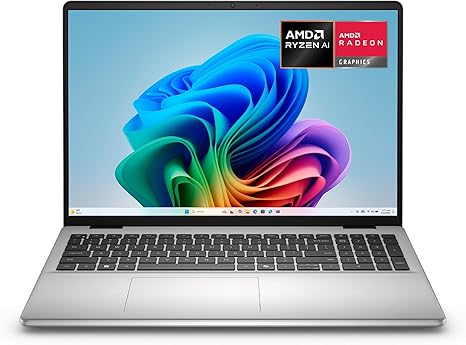
Dell 16 Laptop
16-inch 2K display
1TB SSD
AMD Ryzen AI 7 350 Processor
AMD Radeon Graphics
32GB Memory
Copilot+
The Bigger Trend Behind AI Laptops
AI PCs signal something larger happening in tech.
For years, innovation meant moving everything online.
Now the industry is reversing direction.
Processing is returning to the device.
This movement — often called Edge AI — combines cloud intelligence with local autonomy.
Technology becomes:
faster
safer
more personal
And importantly, less dependent on constant connectivity.
What This Means for the Future of Work
Within a few years, you may notice:
Meetings summarized automatically before they end
Documents drafted based on context
Devices adapting to your workflow patterns
Fewer apps needed to accomplish the same work
Your laptop stops being a tool you manage.
It becomes a collaborator.
Final Thoughts
The biggest misconception about AI is that it replaces human work.
In reality, the most powerful innovations remove friction around human thinking.
AI laptops don’t make you smarter.
They make thinking easier.
And in 2026, that might be the most important upgrade your workflow can get.